Project roadmap template
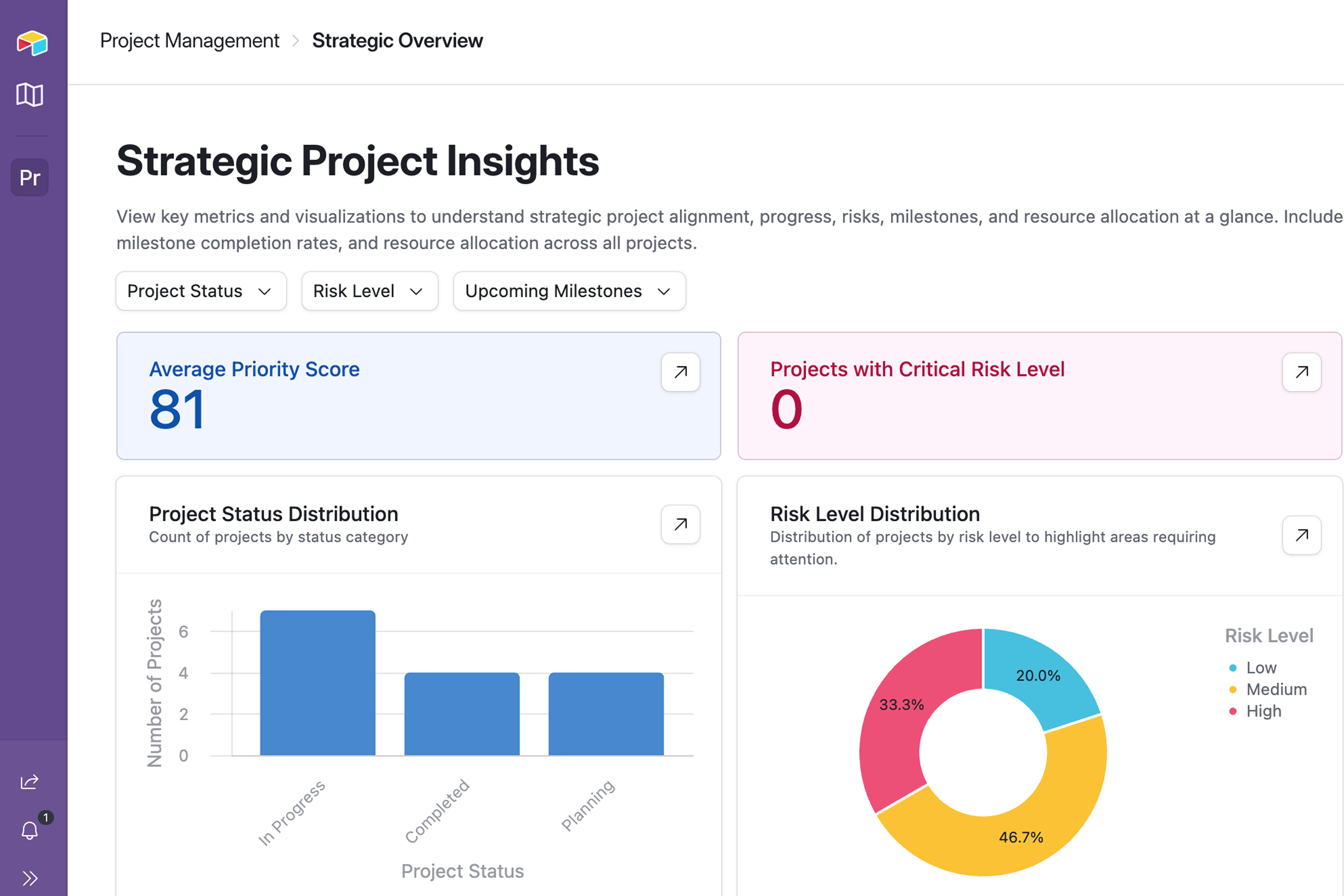
A project roadmap helps teams plan more effectively, connecting timelines, deliverables, owners, and stakeholders for shared alignment. This project roadmap template gives you a flexible, visual way to track projects, tasks, and milestones so everyone stays aligned as work moves forward. And with built-in AI, you can update stakeholders automatically and surface project risks before they slow you down.
What is a project roadmap template?
A project roadmap template is a structured, visual way to plan, track, and communicate project timelines, priorities, and progress. Project managers, product managers, team leads, individual contributors, and stakeholders can use the roadmap as a single source of truth to help plan, coordinate, and visualize projects clearly. This template shows which projects are happening, upcoming tasks, and how the work aligns with strategic goals.
Why use a project roadmap template?
A project roadmap template can help teams manage projects—like product development, marketing roadmaps, and technology roadmaps.This template gives teams a sense of the big picture, tying roadmap projects to business goals. As a pre-built framework, it comes with fields already set up for projects, tasks, milestones, and timelines, keeping everything connected and in sync. Built-in automations handle task status updates and project feedback workflows, so you can spend less time on manual work.
- Time savings: Managing project roadmaps with a template affords you the ability to avoid using tools like spreadsheets or disconnected documents to track progress. This template is pre-built and configured for projects, tasks, milestones, and timelines, eliminating repetitive and manual updates, keeping all the data connected and in sync.
- Valuable project management insights: Project roadmaps are a valuable tool for understanding how your organization gets work done. This template has customizable views, like timelines, kanban boards, and calendars to track progress, risks, and make dependencies easier to spot. This helps teams glean project status, blockers, priorities, and ideal outcomes at a glance, rather than scanning rows of less structured data.
- Greater productivity: Spreadsheets like Excel and Google Sheets serve an important function, but they shouldn’t be your first choice for project roadmap management. Static spreadsheets are harder to scale as projects change, and disconnected files are hard to share with the right level of detail for different stakeholders. This template is easy to share with stakeholders, with dashboards containing real-time data.
What does our project roadmap template include?
This free project roadmap template is ready out-of-the-box, with a number of features that work for different kinds of projects and businesses. Here’s a closer look at the features available when you try this template, as well as details on how to customize it for your specific business needs.
A central database
This template starts with a central database with all of your project information to help plan the roadmap from end to end, including goals, priority, status, dates, and ownership to keep teams aligned. All of this data is connected under the hood, so updates deploy all over the project trackers and real-time data populates the dashboards automatically.
Task breakdowns
Pre-configured project roadmaps and timelines break projects into actionable steps with different owners – laddering from individuals up to teams – and statuses, which helps projects move forward clearly.
Milestones and goals
This project roadmap template enables teams to tie their workflows to goals at every step, which creates accountability as projects progress. With key milestones tracking along projects, dependencies and blockers become visible.
Custom views
For different stakeholders and their various needs, this template has different, customizable views available. Users can visualize the project roadmap with a kanban board, calendar view, a timeline, or grids that display the same info, but sliced and diced as needed.
AI expertise
AI helps bring opportunities for efficiency to the surface, and this template has AI built in across the experience – from AI generated project summaries to reduce time spent perusing the data, to natural-language power prompting from a built-in AI expert for deeper customization or more specific reporting.
Project intake forms
To prevent ad-hoc requests from throwing your roadmaps off, teams can utilize a form that captures essential project info, like strategic alignment, timeline, ownership, and risk. The request is triaged, where somebody must approve and assign. This helps teams stay on top of requests and prioritize tasks on the roadmap.
How to use the project roadmap template
- Gather data on your projects: Start by identifying your active projects, goals, owners, timelines, and success metrics. Understanding your strategic objectives and timeframes make it easier to manage project roadmaps holistically.
- Populate the template with your own data: You can upload project management data and notes from spreadsheets, or use Airtable’s built-in AI expert, Omni, you can remove the sample data and begin filling in your own, whether you collected it at the outset or as your projects take shape.
- Customize the template with Omni: Using natural language prompts like “Show me all of my team’s pending projects,” or “Create a table for my sales team’s enablement material,” you can customize the template for your business’ specific needs. No code or building expertise required.
- Surface project insights: Track your projects over time against KPIs to gain insight into how to optimize your team’s workflows, identify bottlenecks, and ship projects faster.
- Share the template with your team: Share your roadmap with your entire team by assigning role-based views, so they can see specific data visualizations, use it to manage their own projects, or submit their own projects for approval with the intake form.
What does a good project roadmap template look like?
A good project roadmap template clearly connects projects, tasks, deliverables, and dependencies in one system. It should use dynamic data visuals instead of static tables to reflect project changes in real time for stakeholders. Unlike spreadsheets like Microsoft Excel or Google Sheets, which can be static, hard to update, and siloed, a good project roadmap template should be easily shareable so everyone can access the information relevant to them. For example, Airtable’s template helps reduce manual updates with built-in automations and enables sharing real-time data, thanks to its database functionality.
Try these other project roadmap templates
Looking for more templates to plan and manage projects? Project management isn’t one-size-fits-all, so we created these different templates for different project use cases.
Project management template
What the template does:
- Centralizes projects, tasks, owners, and timelines in one place so teams can see progress at a glance.
- Helps teams plan, prioritize, and track work across multiple projects with clear statuses and deadlines.
- Provides flexible views (like timeline, kanban, or list) to manage work the way each team prefers.
How this template helps teams: This template helps teams by giving them a shared, up-to-date view of projects so everyone knows what’s happening, what’s next, and who’s responsible.
AI project management template
What the template does:
- Organizes projects end to end with AI powered fields, from idea and experimentation through launch and iteration.
- Tracks key details like use cases, owners, status, risks, and dependencies in one shared system.
- Gives teams clear visibility into progress across multiple AI initiatives with flexible, role-based views.
How this template helps teams: This template helps teams by bringing structure and clarity to AI work, so projects move faster from concept to impact without getting lost in experimentation.
Event proposal template
What the template does:
- Captures all the key details of an event proposal, like goals, scope, budget, timeline, and stakeholders.
- Standardizes proposals so teams can easily compare, review, and approve events faster.
- Keeps everything organized from initial pitch through sign-off, with clear ownership and next steps.
How this template helps teams: This template helps teams by turning event ideas into clear, compelling proposals that are easy to review, align on, and move forward with.
Product roadmap template
What the template does:
- Uses AI-roadmapping tools to track product milestones, align stakeholders, and allocate resources.
- Has different, audience-specific views for stakeholders to glean insights and data without jumping from tool to tool.
- Contains customizable workspaces that work out of the out-of-the-box to ship products and features.
How this template helps teams: The product roadmap template helps agile teams working on constantly developing projects stay on top of their tasks, communicate roadmap advances to stakeholders, and contains time-saving native AI features.
Frequently asked questions
What are the key elements to include in a project roadmap?
Essential elements include goals and objectives, milestones, deliverables, timelines with start and end dates, dependencies, resources, and status indicators, with color-coding to enhance clarity.
How do I create a project roadmap using a template?
Try the template here, then start by defining objectives and scope, identify key deliverables and milestones, set a realistic timeline, allocate resources and tasks, gather stakeholder feedback, and refine iteratively.
What types of project roadmap templates are available?
Common types include one-page summaries, kanban boards, Gantt charts, quarterly or annual views, swimlane designs for multiple work streams, Agile sprint roadmaps, and portfolio overviews in formats like Excel, PowerPoint, and Google Sheets.
When should I use a project roadmap template?
Use it for high-level planning to communicate progress to stakeholders, align teams on priorities, track dependencies in multi-phase projects, or manage portfolios across short-term or long-term initiatives.
How does a project roadmap differ from a project plan?
A project roadmap offers a high-level strategic overview of milestones and timelines, while a project plan details tasks, resources, and execution steps for full project management.
Other Project Management templates


Not finding a template that fits your needs?
Build it with AI