Invitation maker template
A great event starts with a great invitation, but the invitation is only one piece of what you're actually managing. There's the guest list to organize, the venue and date to confirm, RSVPs to track, and a dozen other details that tend to live in different places until someone drops the ball on something important.
Airtable's invitation maker template brings all of it together. Design stunning party invitations, wedding invitations, save the date cards, and more using the built-in page designer block, while simultaneously managing your guest list, event details, and RSVP tracking in the same connected workspace. No more switching between a design tool, a spreadsheet, and your email inbox to keep everything straight.
Whether you're planning an intimate brunch, a sweet 16, a quinceañera, a bachelorette party, or a full wedding weekend, this template gives you the structure to stay organized and the creative flexibility to make every invitation feel exactly right.
Design beautiful invitations and manage your event in one place with Airtable's free template
More than an invitation maker: a complete event planning system
Most online invitation tools stop at the design. You pick a layout, customize the event details, send the link, and then track RSVPs in a separate spreadsheet, or worse, in your inbox. Airtable's template takes a different approach: the invitation design and the event management system live in the same place, feeding each other.
When you update your event details in the events table, the date, the venue, the dress code, those changes can flow directly into your invitation design. When a guest RSVPs, their response lands in the same system you're using to manage the guest list. And when you're ready to print place cards or design a flyer for social media promotion, the information is already there, ready to pull from.
This connected approach is what separates Airtable's invitation maker from standalone design tools like Canva. You still get beautiful, customizable invitation design, but you also get the operational backbone to actually run your event without losing track of the details.
Ready-made invitation templates for every occasion
The template comes with a set of ready-made invitation designs built using Airtable's page designer block. Each is fully customizable, swap fonts, adjust layouts, change colors, resize elements, and add your own personal touch to make the design match the event and your aesthetic.
- Ready-made designs are available across a wide range of occasions:
- Weddings and pre-wedding events: Wedding invitations, save the date cards, rehearsal dinner invitations, bridal shower invitations, and engagement party invitations. Wedding invitation design tends to benefit from classic typography, elegant layouts, and a restrained color palette, the template's wedding-focused designs reflect that, while still leaving room for more expressive choices like watercolor accents or modern minimalist treatments.
- Milestone celebrations: Birthday party invitations from children's parties through adult milestone birthdays, sweet 16 invitations, quinceañera invitations, bat mitzvah invitations, and retirement party invitations. Each of these occasions has its own visual conventions, the template's designs account for that, so you're starting from something that already feels appropriate rather than adapting a generic layout.
- Life events and announcements: Graduation party invitations, graduation announcements, wedding announcements, and baby shower invitations. These designs tend to balance celebratory energy with clarity, guests need to know what they're being invited to and why it matters, so the event details need to be prominent without overwhelming the design.
- Social occasions: Bachelorette party invitations, bachelor party invitations, cocktail party invitations, housewarming invitations, open house invitations, brunch invitations, and new year's event invitations. These tend to allow for more creative latitude, bold typography, playful color palettes, and unconventional layouts all work well depending on the tone of the event.
If none of the ready-made designs fits your vision, the template is equally accommodating of your own designs. Upload your own layouts, apply your own fonts, and use the page designer block as the production tool for whatever creative direction you're taking.
Designing invitations that feel personal
The best invitation cards don't just communicate event details, they set the tone for the whole experience. A watercolor floral design signals something different than a sleek minimalist card. Pastel colors feel different from deep jewel tones. A handwritten-style font carries a different energy than structured serif typography.
Airtable's page designer block gives you the control to make these choices intentionally. Adjust fonts, colors, and layouts without being locked into a rigid template design. Resize elements to fit different formats, a standard printed invitation, a social media graphic, a digital card, or a printable invitation sized for home printing. Add a QR code that links guests to your RSVP page, your wedding website, or a digital version of the invitation for easy sharing.
The result is an invitation that carries a genuine personal touch, one that reflects the event and the people hosting it, rather than looking like every other free invitation template generated by the same tool.
For events where design consistency matters across multiple printed pieces, wedding invitations paired with save the date cards, place cards, menus, and ceremony programs for example, the template's connected structure means you can maintain consistent typography, colors, and layouts across every piece without having to manually replicate design choices each time.
What's included in the invitation maker template?
An invitation management template typically includes a way to track guests, organize event details, and connect the two so headcount and logistics stay accurate as plans evolve. This template includes an invites table and an events table out of the box, and can be extended with new fields, views, and automations using natural language prompts. Here's what's included in this template:
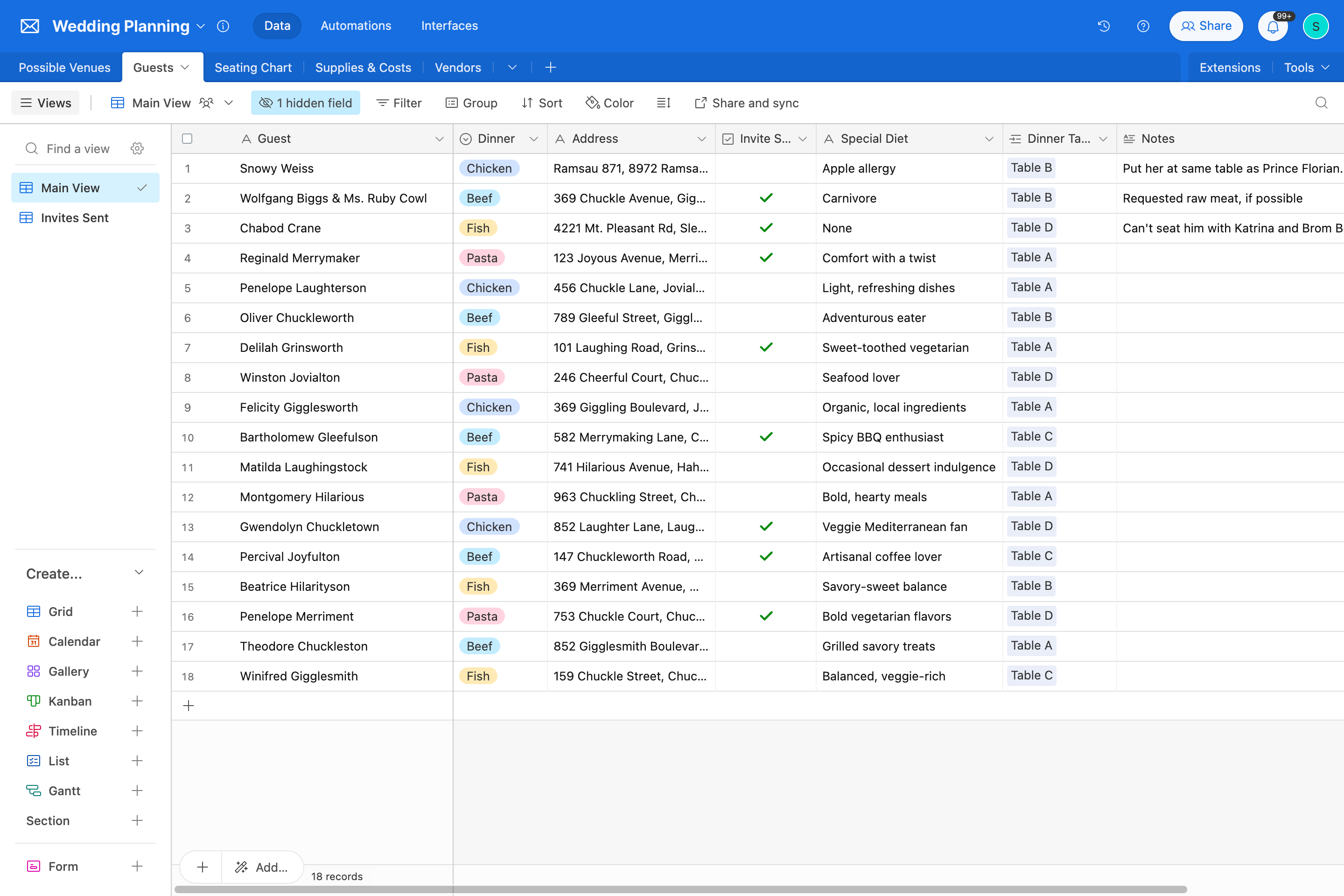
- Invites table: This table tracks every guest with their name, mailing address, phone number, a plus one checkbox, a plus one helper field that automatically displays "Plus One: ____________" on printed invitations when the checkbox is checked, a guest count that calculates automatically as 1 or 2 based on the plus one status, and a link to the events they're invited to. It is designed for hosts managing guest lists across one or more events who need an accurate, always-current headcount without manual tallying. This helps party planners and wedding coordinators track RSVPs, plus ones, and headcount in one place without cross-referencing separate spreadsheets.
- Events table: This table defines each event with a name, date, address, and a linked list of all guests invited to it, so total headcount per event is always visible at a glance. It is designed for hosts managing multiple events simultaneously, such as a rehearsal dinner, bridal shower, and main wedding, who need each event's guest list kept separate but accessible in one workspace. This helps hosts and event planners avoid the confusion of overlapping guest lists and conflicting headcounts when coordinating across multiple occasions.
- Field Agents: This template does not currently include built-in Field Agents, but AI fields can be added to extend its capabilities, for example a field that drafts a personalized invitation message based on the guest name and event details, or a field that suggests follow-up messaging for guests who haven't responded. Adding these fields transforms the template from a manual tracking system into one that actively assists with guest communication. This helps hosts save time on personalized outreach across large guest lists without sacrificing the personal touch that makes invitations memorable.
- Omni for customization: Airtable's built-in AI building expert, Omni, lets you extend and adapt this template using natural language, for example "add a field to track RSVP status," "create a field for dietary restrictions," or "add an automation to notify me when a new guest is added," without requiring manual configuration. This helps hosts tailor the template to their specific event needs without technical setup overhead.
- Omni for reporting: Omni can answer questions about your guest and event data on demand, such as "how many guests are coming to the wedding?", "what's the total headcount for all events?", or "which guests have a plus one?", surfacing the answers your team needs without manually counting or filtering records. This helps hosts and event coordinators stay on top of headcount and logistics at any point in the planning process.
Managing guest lists and RSVPs without the chaos
The invitation is the front-facing piece. Behind it, the guest list and RSVP management is where most event planning chaos actually lives.
Airtable's template handles both. The invites table gives each guest record a structured set of fields including contact information, plus one status, guest count, and linked event, with the guest count calculated automatically so your headcount is always accurate. Filters let you instantly see who hasn't responded, who's confirmed, who's declined, and who you need to follow up with.
For large events, weddings, graduation parties, retirement parties, the ability to filter and sort a guest list of hundreds of people without scrolling through a spreadsheet is genuinely useful. For smaller events like a bridesmaid brunch or a cocktail party, the structure is equally helpful even if the scale is more modest: you still know exactly where things stand without having to hold it all in your head.
RSVP tracking connects directly to your headcount, which connects to your venue capacity, which connects to your catering numbers. When one number changes, the ripple effects are visible immediately rather than surfacing as a surprise the week before the event.
From invitations to event day: one connected workspace
The template's value extends beyond invitation design and guest list management. Because everything lives in one connected system, Airtable becomes the operational home for the full event planning process:
- Venue and date management: The events table documents the confirmed date and address for each event, with each event linked to all its invited guests, so nothing gets confused when you're managing multiple occasions at once, a not-uncommon situation for anyone planning a wedding weekend that includes a rehearsal dinner, a morning-after brunch, and the main event.
- Vendor and supplier coordination: Link caterers, florists, photographers, and other vendors to the relevant event records. Track deposit dates, final payment deadlines, and delivery confirmations in the same system you're using to manage the guest list and design the invitations.
- Printed materials beyond invitations: The same page designer block that produces your invitation cards can generate place cards, table numbers, menus, programs, and thank-you cards, all pulling from the same event data and maintaining the same design language. This is particularly valuable for weddings and formal events where visual consistency across printed materials matters.
- Social media assets: Resize your invitation design to social media dimensions for sharing event announcements, countdown posts, or save the date graphics across platforms. The same design, adapted for the channel, without starting from scratch.
Try these Claude prompts with the invitation maker template
Connect this template to Claude in just a few clicks. Claude can take direct action in this template, adding guests, updating event details, and surfacing headcount and RSVP insights without leaving your conversation. Here are some prompts you can try:
- Here's my guest list for [EVENT NAME]: [PASTE LIST WITH NAMES AND ADDRESSES]. Add each person to the invites table, link them to the right event, and flag anyone who should have a plus one based on the notes I've included.
- Review all guests linked to [EVENT NAME] and tell me the total confirmed headcount, how many have a plus one, and which guests haven't been assigned to an event yet so I can follow up.
- I'm adding three new events to the template: [PASTE EVENT NAMES, DATES, AND ADDRESSES]. Create a record for each one and then add these guests to each event: [PASTE GUEST ASSIGNMENTS].
Frequently asked questions
How is this different from designing invitations in Canva?
Canva is a strong standalone design tool for invitation cards and social media graphics, but it doesn't manage your guest list, track RSVPs, or connect your event details to your printed materials. Airtable's template gives you invitation design through the page designer block alongside a fully functional event management system. Changes to your event details update in one place and flow through to your designs and your guest records, rather than requiring manual updates across separate tools. For anyone managing a complex event with many moving parts, that integration is the key difference.
Can I use my own invitation designs, or am I limited to the ready-made templates?
You can use either. The ready-made invitation templates are a starting point, use them as-is, customize them to fit your event, or replace them entirely with your own designs in the page designer block. The template is built to accommodate your creative direction rather than constrain it.
Can this template handle multiple events at the same time?
Yes. The events table supports multiple events simultaneously, each linked to their own set of guests through the related event field in the invites table. This is particularly useful for wedding planning, where you might be managing invitations and guest lists for a rehearsal dinner, bridal shower, and the main wedding across overlapping timelines, or for event professionals managing multiple client events at once.
What invitation formats does the template support?
The page designer block supports a range of output formats and sizes. You can design and export standard printed invitation sizes, digital invitation cards for online sharing, save the date cards, place cards, and social media graphics. Resize functionality lets you adapt a single design to multiple formats without recreating it from scratch, keeping your typography and layout consistent across every piece.
Every event deserves a great invitation, and a system behind it
A beautiful invitation card sets expectations. A well-organized event delivers on them. Airtable's invitation maker template gives you both: the creative tools to design party invitations, wedding invitations, graduation announcements, and more that feel genuinely personal, and the operational structure to manage guest lists, track RSVPs, and coordinate every event detail in one connected workspace.
Start with a ready-made design or bring your own. Customize fonts, layouts, and colors to match your event's personality. Add a QR code, resize for social media, print place cards, all from the same template, without switching tools.
Your event deserves more than a free invitation template and a separate spreadsheet. Give it a system that actually keeps up with everything you're managing.
Design invitations with Airtable's free template
Other Personal templates
Not finding a template that fits your needs?
Build it with AI